

How to off auto Windows update | Auto Windows Update off Bangla | Auto Windows Update off

How to off auto Windows update
ভুমিকাঃ- নতুন পিসি কেনার পর বা নতুন Windows setup দেয়ার পর আমরা সাধারণত ৩টি সমস্যায় পরে থাকি এগুলোর সমাধানে আজ সংক্ষেপে আলোচনা করা হবে।
- Windows Update
- Windows Active
- Driver Install
Windows Update: এটি Windows এর সকল প্রকার Update থেকে শুরু করে Driver ও Install করে দেয় ,তাই এটি খুবিই গুরুত্বপূর্ণ। তবে অনেকের ইন্টারেনেট পর্যাপ্ত না থাকায় বা নেট না থাকায় Update করতে পারে না । বা বার বার Update হবার ফলে ডাটা শেষ হয়ে যায়। তাই Windows Update Off রাখার প্রয়োজন পরে।
Windows Update Off Process:
- This Pc তে রাইট ক্লিক করে
- Manage ঢুকতে হবে,
- Service and application
- Service
- Windows Update
- Startup type (Disable),
- Service status: (Stop) করে Ok করি।

আরো দেখুন
or
How to off auto Windows update
Settings> Windows Update> Pause Updates for এ ২ ৩ বার ক্লিক করে সময় বাড়িয়ে নিতে হবে, তারপর Advanced option থেকে Download Updates over metered Connections (OFF), Delivery Optimization (OFF) করতে হবে।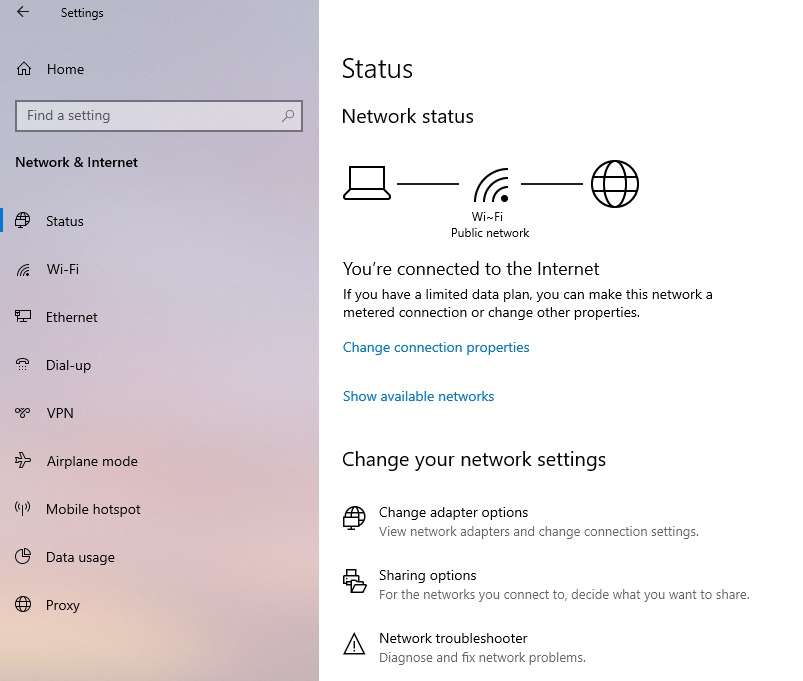
How to off auto Windows update
- Setting
- Network & Internet
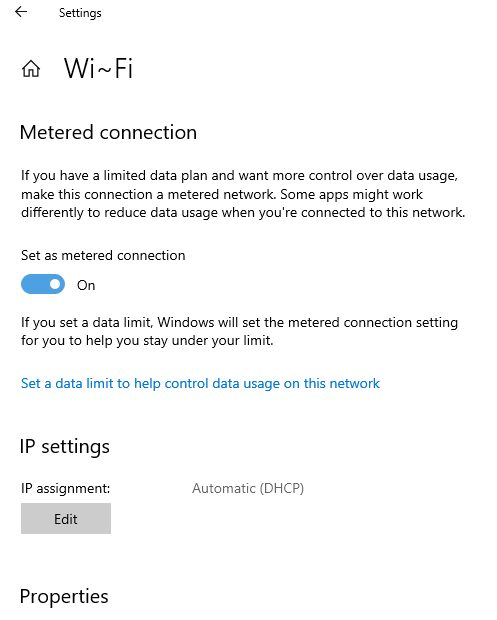
- Change connection properties (যার মাধ্যমে net connected),
- Metered connection
- Set as metered connection (ON)
Metered connection করার ফলে Windows নিজে নিজে Update download করবে না আপনি চাইলে তবেই করবে।
Windows Active: যেহেতু আমাদের অনেকের পক্ষেই Original windows কেনা সম্ভব হয় না | তাই windows Crack করে Windows Activate করতে হয়, যদিও Crack ব্যবহার করলে security risk থেকে যায় তবুও বাধ্য হয়ে তা ব্যবহার করতে হয়। ধন্যবাদ
আরো দেখুন
- How to Show missing Desktop Icons
- google password download
- How to Fix Bluetooth Icon Missing From windows 11
- bios not work
- আইকন/ফাইল মোভ হয়না,সমাধান
- Highlight Mouse Pointer in windows 11
- Remove active windows watermarks
Tags
#Howtooffautowindowsupdate
#AutoWindowsUpdateoffBangla
#AutoWindowsUpdateoff
#windows11
#offwindowsautoupdate


0 মন্তব্যসমূহ